

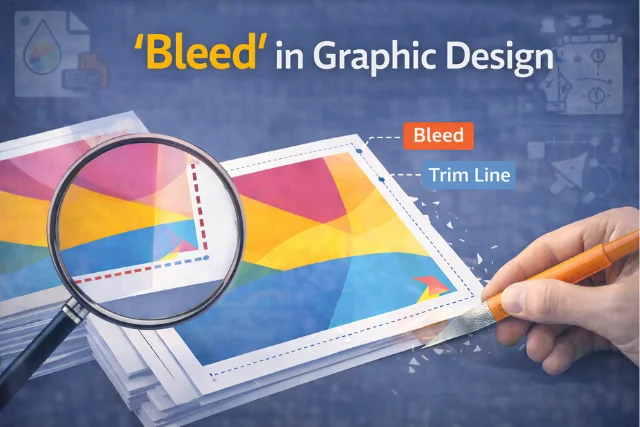
What does bleed mean in graphic design is one of the most common questions beginners ask when they start working with print design. Bleed is an extra area added around the edges of a design to make sure there are no white borders after printing and cutting.
In simple words, bleed allows your design to extend slightly beyond the final size of the paper. This extra space helps printerests trim the paper cleanly without ruining the design. Understanding what bleed means in graphic design is essential if you are creating brochures, business cards, posters, flyers, or magazines. If you’re building your skills, you should also check can I include class projects on graphic design portfolio to improve your design journey.
What Does Bleed Mean in Graphic Design and Why Is It Important?
To fully understand What does bleed mean in graphic design, you need to know how printing works. Printing machines print on large sheets, and then those sheets are cut down to size. Cutting is not always 100% precise.
Bleed acts as a safety margin. If the cut shifts slightly, the bleed ensures your background colors or images still reach the edge of the page. Without bleed, you might end up with thin white lines around your design, which looks unprofessional.
Bleed vs Trim vs Margin in Graphic Design
These three terms are often confused, but they serve different purposes.
| Term | Meaning | Purpose |
| Bleed | Extra area beyond the edge | Prevents white borders |
| Trim | Final cut size | Shows where paper will be cut |
| Margin | Safe area inside design | Keeps text away from edges |
Knowing the difference helps designers create print-ready files correctly.
Why Bleed Is Important for Print Designs
Bleed is especially important for designs that have:
- Full-page background colors
- Images touching the edges
- Edge-to-edge patterns
Without bleed, even the smallest cutting error can ruin the final print. This is why printers often reject files that don’t include bleed. Learning these basics is part of becoming what makes a good graphic designer in the industry.
When designers understand what does bleed mean in graphic design, they can avoid costly reprints and delays.
Common Print Items That Require Bleed
Bleed is commonly used in:
- Business cards
- Brochures
- Flyers
- Posters
- Magazines
- Book covers
Any design meant for professional printing usually requires bleed. These projects are also essential when building a graphic design portfolio with no experience.
Standard Bleed Size in Graphic Design
The most common bleed size is 3 mm (0.125 inches) on all sides. However, this can vary depending on the printer.
| Region | Standard Bleed Size |
| Most countries | 3 mm |
| United States | 0.125 inches |
| Large format printing | 5–10 mm |
Always check your printer’s guidelines before finalizing your design.
How to Set Bleed in Graphic Design Software
Understanding what does bleed mean in graphic design also means knowing how to set it correctly in design tools such as Adobe Photoshop.
Setting Bleed in Adobe Photoshop
- Open a new document
- Increase canvas size by bleed amount
- Extend background or images into bleed area
Setting Bleed in Adobe Illustrator
- Create a new document
- Enter bleed values during setup
- Extend design elements to bleed guides
Setting Bleed in Adobe InDesign
- Enter bleed values while creating document
- Use bleed guides for layout
- Export with bleed and crop marks
What Happens If You Don’t Use Bleed?
If you don’t include bleed:
- White edges may appear
- Prints look unfinished
- Printers may reject your file
- Extra cost for reprinting
This is why professionals stress learning what does bleed mean in graphic design early in your design journey.
Common Bleed Mistakes Designers Make
- Forgetting to extend backgrounds into bleed
- Placing text inside bleed area
- Using incorrect bleed size
- Exporting without bleed settings
Avoiding these mistakes improves print quality instantly and helps clarify concepts like which of the following is not true about graphic design.
Bleed in Digital vs Print Design
Bleed is mainly used for print design, not digital design.
| Design Type | Bleed Needed? |
| Website design | No |
| Social media graphics | No |
| Printed posters | Yes |
| Business cards | Yes |
| Magazines | Yes |
Digital screens don’t require cutting, so bleed is unnecessary there. However, understanding basics like this also answers whether does graphic design need coding.
What Does Bleed Mean in Graphic Design for Beginners?
For beginners, what does bleed mean in graphic design can be simplified as “extra space for safety.” It protects your design from cutting errors and ensures a professional finish.
Once you understand bleed, your print designs instantly improve. It’s a small detail that makes a big difference.
Conclusion
Understanding what does bleed mean in graphic design is essential for anyone working with print materials. Bleed ensures your designs look clean, professional, and free from unwanted white borders.
Whether you’re a beginner or an experienced designer, using bleed correctly saves time, money , and frustration. Mastering this simple concept will instantly elevate the quality of your print designs.
Frequently Asked Questions (FAQs)
1. What does bleed mean in graphic design in simple words?
Bleed is extra space added around a design so colors or images reach the edge after cutting.
2. Is bleed necessary for all designs?
No, bleed is only needed for print designs, not digital designs.
3. How much bleed should I use?
Most printers recommend 3 mm or 0.125 inches on all sides.
4. Can I add bleed after designing?
Yes, but it’s better to set bleeds before starting the design.
5. Do printers always require bleed?
Most professional printers do, especially for edge-to-edge designs.