

Written by the ProTechMagazine Editorial Team | Reviewed by Jagdish Bhatt, Digital Marketing Expert, protechmagazine.com | Last updated: November 2026
Quick answer
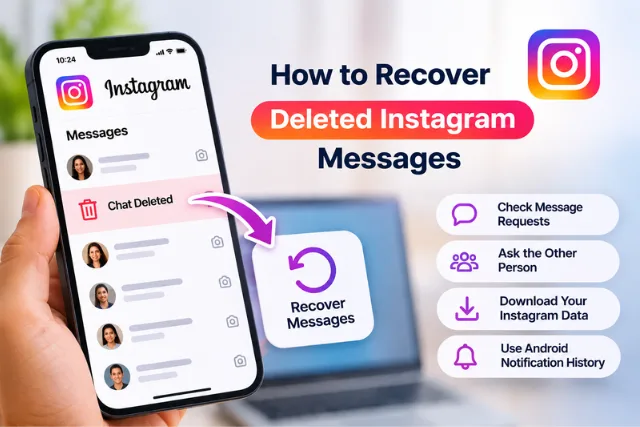
There is no direct undo button for deleted Instagram DMs, and the Recently Deleted folder does not include messages. However, there are a few methods you can try if you want to learn how to recover deleted Instagram messages. Your best shots are asking the other person (if you only deleted the chat on your side), checking message requests and hidden requests, requesting your data download from Accounts Center as soon as possible, and, on Android, checking Notification History. Messages sent in vanish mode, and ones unsent a long time ago, usually can’t be brought back.
You open Instagram to find an address someone shared, a screenshot of a receipt, or an important conversation, only to discover that the chat is missing.
Instagram’s Recently Deleted feature provides a limited recovery period for certain content, but it does not cover DMs. You can also learn how to check recently deleted posts on Instagram.
How to Recover Deleted Instagram Messages: First, Figure Out What Kind of Deletion It Was
This matters more than anything else, so take ten seconds to think back.
You deleted the whole chat: When you delete a conversation from your inbox, it only disappears for you. The other person still has their full copy of the thread. This is actually the best-case scenario.
You or the other person unsent a message: Unsending removes the message for everyone in the chat. It’s much harder to get back.
It was in vanish mode: Vanish mode messages are designed to disappear once they’re seen and the chat is closed. There’s no real recovery for these.
It was a disappearing photo or video: “View once” media is built to vanish too, and it’s not kept for you.
The chat was never deleted at all: Sometimes it’s just sitting somewhere you haven’t checked. More on that below.
If you deleted the conversation only from your inbox, there may still be a way to get it back. However, if the message was unsent or sent in Vanish Mode, recovery options are limited.
Method 1: Check Instagram Message Requests and Hidden Requests
Before assuming the worst, rule out the boring explanation. Instagram has a couple of folders people forget exist.
Open your inbox and look at the top for Requests. Messages from people you don’t follow land here, and so do some chats after you’ve changed privacy settings. Inside Requests, look for Hidden requests as well. Instagram automatically filters messages it identifies as spam, offensive, or potentially unwanted. Sometimes, an important conversation may also end up in this folder.
Also try the search field that appears at the top of your inbox. Enter the name or username of the person. You might find that a thread you haven’t seen in a while still pops up in search. If you cannot find someone’s profile or conversation, check these signs someone has blocked you on Instagram.
It’ll take a minute-and, strangely enough, that “deleted” chat was typically stored elsewhere.
Method 2: Ask the Other Person to Share the Deleted Chat
This may seem obvious, but asking the other person to share their copy is often one of the most effective ways to retrieve a deleted conversation. If you’re looking for ways on how to recover deleted Instagram messages, this is one of the first options worth trying when you’ve deleted the chat only from your side.
If you’ve deleted the chat on your end, the other person’s copy hasn’t been. They can send you a screenshot of what you need-or just tell you what was said-or forward you a copy. If it’s a group chat, someone else is still hanging onto it, too.
It can feel a little awkward to ask, but most people won’t think twice. It is also safer than trying multiple third-party recovery apps. However, this method will not help if the message was unsent or sent in Vanish Mode.
Method 3: Recover Deleted Instagram Messages Through Data Download
Instagram lets you request a copy of your account information through Accounts Center. You can follow the official instructions to download your Instagram information and select the data you want to include. However, the downloaded file only contains information that Instagram makes available for your account at the time of the request.
It does not guarantee that previously deleted messages will be included. So if a message was fully removed from Instagram’s systems, it won’t be in there. But if you act quickly after deleting a chat, it’s worth a try, and it doesn’t cost anything.
Here’s how to request it:
- Open Instagram and go to your profile.
- Tap the three lines in the top right, then tap Accounts Center.
- Tap Your information and permissions.
- Tap Download your information (on some versions it’s called Export your information).
- Choose your Instagram account and select Some of your information.
- Pick Messages, choose a date range and format (HTML is easier to read), and submit the request.
Instagram will email you when the file is ready. Sometimes that’s within minutes, sometimes it takes a day or longer for bigger accounts. When it arrives, open the messages folder and look for the conversation by the person’s username.
Instagram does not guarantee a specific recovery window for deleted messages through data downloads. Therefore, it is worth submitting your request as soon as possible. So think of it like this: the sooner you request it, the better your odds.
One more tip: if you’ve ever downloaded your Instagram data in the past, dig out that old file. It’ll include every message that existed at the time you downloaded it, even if you’ve deleted those chats since.
Method 4: Check Android Notification History
This only works on Android, and only if that setting was enabled before the message was deleted. But if it is enabled, it works great. Android 11 and later can store a record of notifications you’ve received.
If Notification History was enabled before the message arrived, its notification preview may still be available even if you later deleted the Instagram conversation.
To see, head to Settings, then Notifications, then Notification history (the path is slightly different on Samsung, Pixel, and other phones). Scroll down to find Instagram.
You’ll only see the preview text, not photos, and long messages may be cut off. It also only covers roughly the last day of notifications on many phones. If the setting was off, it won’t show anything from before you turned it on.
Phones don’t have an equivalent feature. Apart from message recovery, Instagram users may also notice changes in their chat appearance. Here’s a quick guide explaining why Instagram messages appear purple and what it means.
Do Instagram Message Recovery Apps Actually Work?
Search this topic and you’ll run into plenty of apps and websites promising to recover any deleted Instagram message, sometimes “from years ago.”
We’d steer clear. Deleted Instagram messages are not necessarily stored as recoverable files on your phone. Most third-party applications cannot guarantee access to messages that are no longer available through Instagram. Many of these tools ask for your Instagram password, which is a real risk to your account, and plenty of them charge before showing you anything useful. Some device-level recovery software can pull fragments from old phone backups, but results are hit or miss and rarely worth the cost for a single chat.
If an app promises to recover messages Instagram itself can’t, that’s your sign to close the tab.
When Are Deleted Instagram Messages Permanently Lost?
Vanish mode messages, view-once media, messages unsent long ago, and old chats that neither you nor the other person saved usually can’t be recovered. It’s frustrating, but knowing the dead ends saves you time chasing them.
How to Prevent Losing Instagram Messages in the Future
A few small habits go a long way:
- Screenshot anything important the moment you get it: addresses, order details, codes, agreements.
- Download your Instagram data every few months if your DMs matter to you, especially for a business account.
- Turn on Notification History if you’re on Android. It costs nothing.
- Double-check before deleting a chat. Once it’s gone on your side, you’re relying on the other person or your data export.
- Keep vanish mode off unless you really want messages to disappear.
Conclusion
Knowing how to recover deleted Instagram messages can save you from losing important conversations, but success depends on how the messages disappeared. Start by checking Message Requests and Hidden Requests. If you deleted the entire conversation, ask the other person for a copy. You can also try downloading your Instagram data or checking Android Notification History if it was enabled beforehand. Remember that there is no guaranteed way to restore every deleted DM.
Frequently Asked Questions (FAQs)
Can you recover deleted Instagram messages?
Sometimes. If you’re wondering how to recover deleted Instagram messages, your best options are asking the other person, checking hidden folders, and downloading your Instagram data quickly. However, none of these methods guarantees recovery.
Does Recently Deleted include messages?
No. It only holds posts, reels, videos, and stories.
If I delete a chat, does the other person lose it too?
No. Deleting a chat only removes it from your inbox. The other person keeps their copy.
What’s the difference between deleting and unsending?
Deleting a chat removes it on your side only. Unsending a message removes it for everyone in the conversation.
Can I recover vanish mode messages?
No. They’re designed to disappear and aren’t kept for you.
How long does the data download take?
It can arrive in minutes or take a day or more, depending on how much data your account has.
Can I recover messages from years ago?
Only if you downloaded your data back then or the other person still has the chat.
Do recovery apps work?
Rarely, and many ask for your password. We don’t recommend them.
Can I see a message someone unsent?
Not on Instagram. On Android, Notification History might show the preview if it was turned on.
Can I recover Instagram messages on my iPhone?
Yes, through the data download or by asking the other person. iPhone doesn’t have Notification History.
Disclaimer
This article is intended for informational purposes only. Instagram’s features, privacy settings, and data recovery options may change over time. The methods discussed do not guarantee the recovery of deleted messages. Always use Instagram’s official tools and avoid sharing your account credentials with third-party recovery services. Refer to Instagram’s official Help Center for the latest information.