


Written by the ProTechMagazine Content Team | Reviewed by Deepu Thakur, Technology Enthusiast | Last updated: September 2026
Quick Answer
Online privacy and secure internet access have become more important than ever. This is why many users search for what is ExpressVPN and how it helps protect browsing activity, hide IP addresses, and access restricted content safely. ExpressVPN is a virtual private network service that encrypts internet traffic and masks your IP address by routing your connection through VPN servers. It can help improve privacy and security while browsing, particularly on public Wi-Fi, and offers apps for devices such as Windows, macOS, Android, and iOS.
ExpressVPN is a popular VPN service that creates an encrypted connection between your device and the internet. It helps users browse securely, avoid tracking, and access websites or streaming platforms from different regions. Users concerned about privacy risks should also learn how to protect data on a mobile device while using public Wi-Fi networks.
Whether you want safer browsing, better privacy, or unrestricted internet access, understanding how ExpressVPN works can help you choose the right VPN solution for your needs.
What is ExpressVPN and How Does it Work?
ExpressVPN is a virtual private network (VPN) service that encrypts internet traffic, hides IP addresses, and allows users to browse securely while accessing restricted content from different regions. It masks your real IP address and reroutes your internet connection through secure international servers. It protects personal data while also helping users access websites, apps, and streaming platforms that may be restricted in certain regions.
The service is known for its military-grade encryption, fast browsing speeds, and a huge number of server locations across different countries.
Key Features Include
| Feature | Benefit |
|---|---|
| AES-256 Encryption | Protects personal data |
| Global Servers | Access international content |
| Kill Switch | Prevents accidental exposure |
| No-Logs Policy | Improves privacy |
| Split Tunneling | Controls app traffic |
| Multi-Platform Support | Works across devices |
These features explain why many users search for download express vpn for personal or professional usage. Users can safely download ExpressVPN from the official website for Windows, macOS, Android, iOS, and browser extensions.
ExpressVPN Login and Account Access
To start using the VPN, users must first complete Express VPN Login through the official website or app. The login process is similar across desktop and mobile devices. Logging in allows access to your subscription account and device activation. If you are using multiple devices, the same login can be used across them (up to the device limit allowed by your plan).
The express vpn activation code is provided after subscription purchase. It is used during first-time setup. Make sure you store it properly because you may need it during device reinstallation.
ExpressVPN Price & Free Trial Options
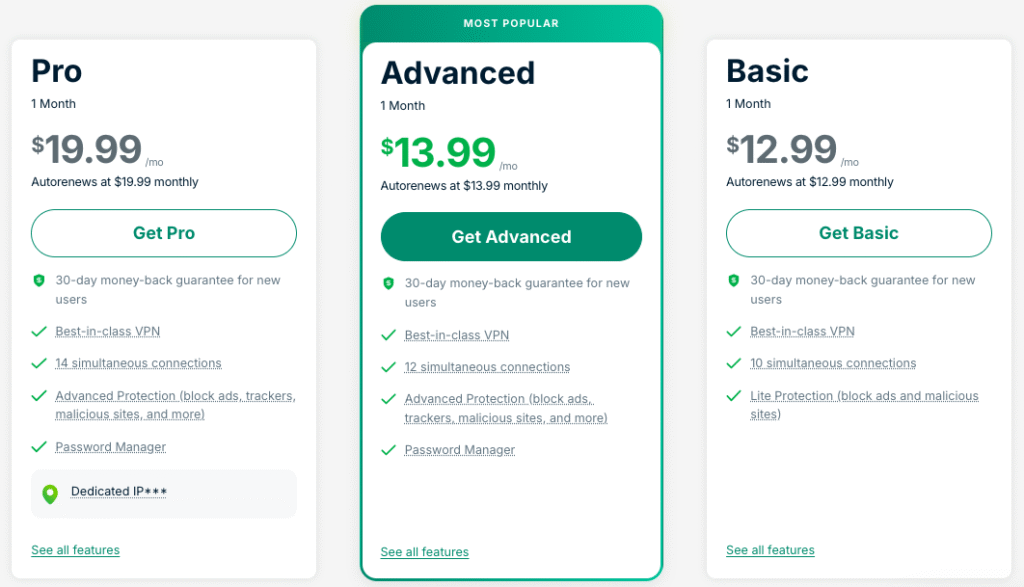
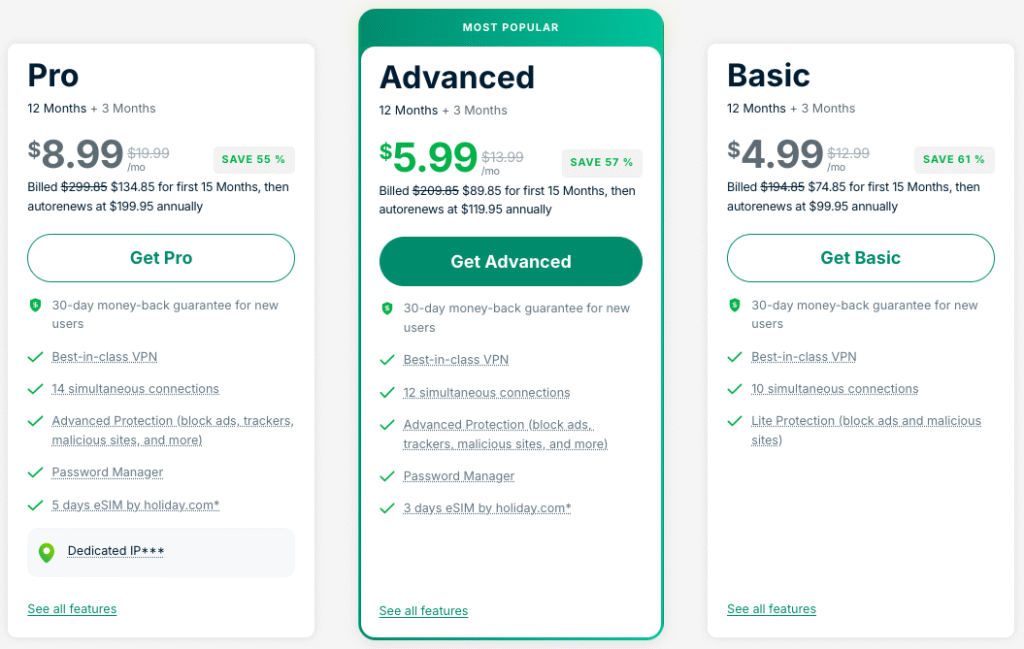
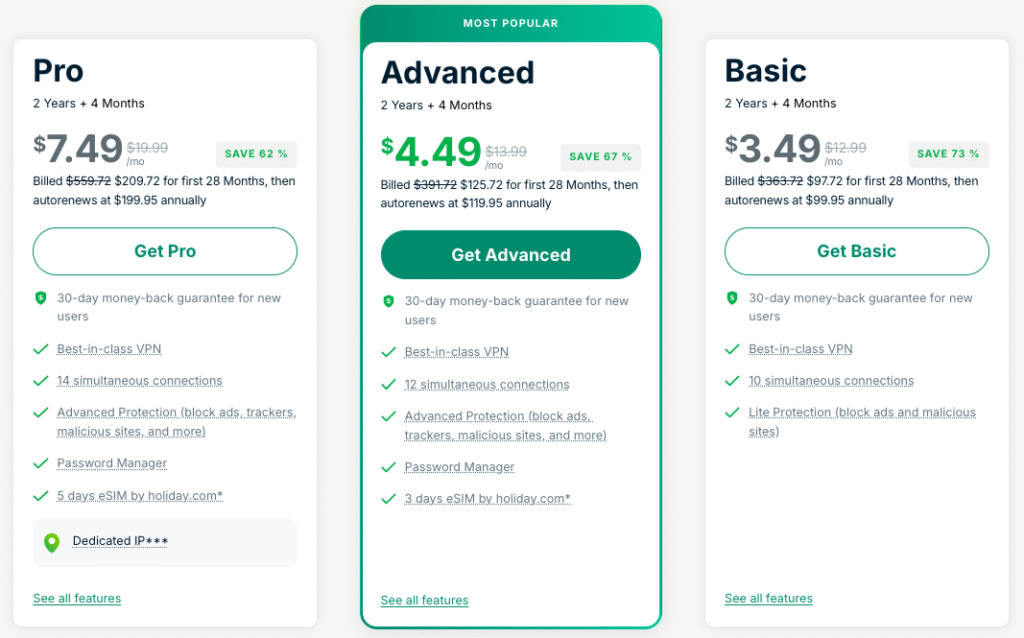
Many users look for express vpn price before subscribing. ExpressVPN offers monthly, semi-annual, and yearly plans. While it may cost slightly higher compared to others, the security, performance, and support justify it.
There is also an express vpn free trial for new users on certain platforms, allowing them to test performance before paying. Additionally, most plans come with a 30-day money-back guarantee, meaning you can cancel if you are not satisfied.
Note: Some users search online for express vpn full key or cracked versions. Downloading cracked VPN software can expose devices to malware, data theft, and serious security risks. Always use the official paid version for guaranteed safety.
Download ExpressVPN (All Devices)
You can easily download express vpn from the official website or app stores. ExpressVPN supports:
- Express vpn for pc (Windows desktop & laptops)
- Express vpn for mac (Apple macOS systems)
- Express vpn for windows specifically tailored installer
- Express vpn apk for Android devices
The installation process is simple and beginner-friendly. Users should always download the application directly from the official website or verified app stores for maximum security.
ExpressVPN Compatibility Across Devices
ExpressVPN supports most modern operating systems and devices, making it easy for users to secure multiple platforms with a single subscription.
ExpressVPN Setup Guide for Different Devices
Below are setup methods by device:
Express VPN for PC
To install express vpn for pc, visit the official website, download the Windows-compatible software, sign in, and enter your express vpn activation code. Once connected, choose a server and browse securely. You can reuse the same login because Express VPN Login credentials are universal for all devices.
Express VPN for Windows
Though similar to PC setup, express vpn for windows provides optimized features like split-tunneling and kill-switch for Windows operating systems. The login and activation process remains similar across all supported devices.
Express VPN for Mac
Users of macOS can easily download express vpn directly from the Mac App Store or website. The app is lightweight and supports seamless Express VPN Login. The performance remains smooth even when streaming or video conferencing.
Express VPN APK (Android App)
Many users prefer installing express vpn apk instead of via Play Store to get earlier updates or regional versions. You can do this from ExpressVPN’s official download page. After installation, do express vpn sign in, apply your activation code, and connect to any server.
Express VPN Free Trial
The express vpn free trial is available for iOS and certain promotional regions. Android users can also test the service through official trial or refund options available on the website. You may also use the 30-day refund guarantee as a trial alternative.
ExpressVPN Price Comparison
| Plan | Billing Cycle | Best For |
|---|---|---|
| Monthly Plan | Pay every month | Short-term users |
| 12-Month Plan | Annual billing | Regular VPN users |
| 2-Year Plan | Long-term savings | Heavy streaming & privacy users |
ExpressVPN 1 Month Pricing Plan
ExpressVPN 12 Month Pricing Plan
ExpressVPN 2 Years Pricing Plan (Up to 73% Off)
Is ExpressVPN Safe to Use?
ExpressVPN is considered one of the safest VPN services because it uses AES-256 encryption, secure VPN protocols, and a strict no-logs policy. It also includes features like a kill switch and DNS leak protection to improve user privacy while browsing online.
Conclusion
Now you clearly understand What is Express VPN and how it ensures privacy, unrestricted browsing, and secure internet access across public and private networks. With global servers, fast streaming performance, app compatibility across all platforms, and strong support, ExpressVPN remains one of the best VPN services in the world. Whether you need stronger online privacy, secure browsing on public Wi-Fi, or access to global streaming content, For users who value online privacy, secure streaming, and safer browsing on public networks, a trusted VPN service can significantly improve digital security.
Frequently Asked Questions (FAQ’s)
1. How to cancel ExpressVPN?
You can cancel your plan from your account dashboard. If within 30 days, you will receive a full refund.
2. Is ExpressVPN good?
Yes, ExpressVPN is widely known for its fast speeds, strong security features, reliable streaming access, and user-friendly apps.
3. Is ExpressVPN legit?
Yes, ExpressVPN is a legitimate and globally recognized VPN provider trusted by millions of users worldwide.
4. What is Express VPN customer service number?
ExpressVPN primarily provides 24/7 live chat support instead of phone support. You can contact them from their official website.
5. Does ExpressVPN work in China?
Yes, ExpressVPN is known for working in regions with internet restrictions, including China, although performance may vary depending on local regulations.
6. Does ExpressVPN slow internet speed?
ExpressVPN is designed for high-speed browsing and streaming. While all VPNs may slightly reduce speed due to encryption, premium servers usually maintain stable performance.
Disclosure: When you purchase a service or a product through our links, we sometimes earn a commission.
Disclaimer
This article is for general informational purposes only and does not constitute legal, cybersecurity, or financial advice. VPN features, pricing, free trials, refund terms, device limits, server availability, and access to region-restricted services can change over time and may vary by country or platform. Always verify the latest details on the provider’s official website before subscribing or downloading software.