

Written by the ProTechMagazine Content Team | Reviewed by Deepu Thakur, Technology Enthusiast, protechmagazine.com | Last updated: August 2026
Quick Answer
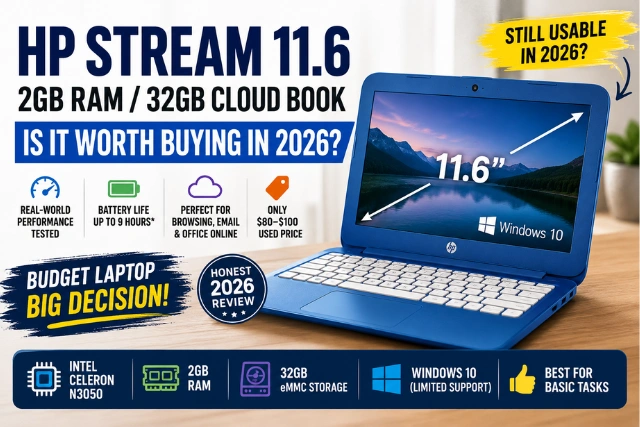
The HP Stream 11.6-inch Celeron 2GB/32GB Cloudbook is still usable in 2026 for basic browsing email Office Online and light streaming, but its 2GB RAM 32GB storage and Windows 10 limitations make it unsuitable for multitasking or long-term use. At $80–$100 in good condition it can make sense as a basic secondary or kids’ laptop.
You’ve seen it while scrolling Amazon, Walmart, or eBay – the HP Stream 11.6in Celeron 2GB 32GB Cloudbook in pink, usually priced somewhere between a pair of sneakers and a decent dinner for four. It’s cute, it’s compact, and that bubblegum-pink lid practically markets itself to students and first-time laptop buyers. But here’s the question that actually matters: can a laptop with a Celeron processor, 2GB of RAM, and 32GB of storage still function as a daily driver in 2026?
This review looks beyond the specifications to examine everyday performance, limitations and whether the low asking price makes sense in 2026.
Who Should Buy It and Who Should Skip It?
| Buy It If You… | Skip It If You… |
| Need email and light browsing | Need real multitasking |
| Are buying for a young kid | Are a college student |
| Work entirely in Office Online / Google Docs | Use Photoshop, editing, or coding tools |
| Want a beater travel laptop | Need Windows 11 and future updates |
| Found it under $100 | Have a budget of $250+ |
Ratings
| Category | Score |
| Performance | ★★☆☆☆ |
| Battery | ★★★★☆ |
| Display | ★★★☆☆ |
| Build | ★★★★☆ |
| Value (under $100) | ★★★☆☆ |
| Overall | ★★★☆☆ |
Pros and Cons at a Glance
Pros:
- Extremely lightweight and portable (2.5 lbs)
- Genuinely good 7–9 hour battery life
- Cheap – often under $100 refurbished
- Fun color options (the pink is iconic)
- Office Online and Google Docs run smoothly. If you’re looking for tools that can make browser-based writing easier, you can also learn what Grammarly is and how it works.
- Silent, fanless design
Cons:
- Only 2GB RAM – soldered, non-upgradeable
- 32GB storage fills up almost immediately
- No official Windows 11 path
- Windows updates are a recurring struggle
- Zero upgrade options (RAM and storage both soldered)
HP Stream 11.6 Cloudbook at a Glance
| Feature | Specification |
| Display | 11.6-inch HD (1366×768) |
| Processor | Intel Celeron (dual-core) |
| RAM | 2GB DDR3 (soldered) |
| Storage | 32GB eMMC |
| OS | Windows 10 (S Mode on most units) |
| Weight | ~2.5–2.8 lbs (1.2 kg) |
| Colors | Pink, blue, purple, white |
| Typical Price | $80–$180 (refurbished / new old stock) |
Why “Cloudbook”? Because HP designed it around cloud services – OneDrive storage, Office Online, web apps — rather than locally installed software. Keep that philosophy in mind; it explains both the price and the limitations. You can also check HP’s official Stream 11 support page for product documentation and support resources.
Design and Build Quality: The Pink Factor
Let’s address why the pink HP Stream Cloudbook is the variant everyone searches for: it’s genuinely one of the most distinctive-looking budget laptops ever sold in the US. The magenta-pink chassis with white keyboard deck stands out in a sea of gray plastic slabs, and it’s a big reason this laptop remains popular as a gift for kids, teens, and students.
Beyond the color, you get a full plastic build that’s surprisingly sturdy for the price, a comfortable-enough chiclet keyboard, a serviceable trackpad, and a practical port selection: two USB-A ports, HDMI, a headphone jack, and — critically — a microSD card slot you’ll definitely need. The webcam is basic 720p territory: fine for showing up to a Google Meet, unflattering in dim light. Speakers are thin but usable for YouTube.
Display Quality
The 11.6-inch HD panel is a 1366×768 TN display — sharp enough at this screen size, but with modest brightness, washed-out colors, and narrow viewing angles. Indoors, it’s perfectly fine for documents, Netflix, and classwork. Outdoors or near a bright window, you’ll be hunting for shade. Par for the course at this price.
Real-World Performance in 2026
Here’s what spec sheets can’t tell you – actual task-by-task experience:
| Task | Real-World Experience |
| Gmail / email | Smooth |
| Word Online / Google Docs | Smooth |
| 1–3 Chrome tabs | Acceptable |
| 5+ Chrome tabs | Slow, tabs reload |
| 10 Chrome tabs | Nearly frozen |
| YouTube / Netflix 720p | Watchable |
| Zoom alone | Works with stutters |
| Zoom + Chrome open | Laggy |
| Photoshop / video editing | Not possible |
| Modern gaming | Not possible |
Modern gaming is not practical on this hardware. If gaming performance is important to you, compare this machine with a proper gaming system and learn how to optimize a gaming PC for 8K gaming.
Everyday browsing: With one or two tabs, the experience is acceptable. Open a fourth tab and the 2GB RAM wall hits – tabs reload, typing lags, and the eMMC storage starts thrashing as Windows swaps memory to disk.
Online classes: Zoom and Google Meet technically work, but expect warm palm rests, occasional video stutter, and near-impossible multitasking during a call. For a kid attending one class with the camera on, it survives.
The pattern is obvious: one thing at a time, preferably in the cloud. In practice, this laptop works best when you stick to one cloud-based task at a time.
Is 2GB RAM Enough in 2026?
Barely and only with strict discipline. Windows 10 alone consumes 1.4–1.7GB at idle. Chrome takes 150–300MB per tab. That math leaves roughly one browser tab of headroom before the system swaps to slow eMMC storage which is when the infamous HP Stream slowness kicks in.
Survival tactics that genuinely help: use Microsoft Edge instead of Chrome (lighter on RAM), keep tabs under three, disable startup apps, and lean on web apps instead of installed software.
The 32GB Storage Problem (Read This Before Buying)
The single biggest ownership headache. Windows 10 plus recovery files eat 20–25GB out of the box, leaving 6–10GB free on day one. Then a major Windows update demands 8–15GB of temporary space and the laptop can’t update itself. This isn’t a rare glitch; it’s the defining HP Stream experience.
Workarounds that make it livable:
- Install a 128GB+ microSD card ($10–20) permanently; redirect Documents, Downloads, and Pictures to it.
- Use OneDrive/Google Drive for files the Cloudbook name isn’t decoration.
- Run Disk Cleanup and Storage Sense monthly.
- Keep a 16GB+ USB drive handy as temporary update storage when Windows prompts.
Can You Upgrade It? (Short Answer: No)
- RAM: Soldered to the motherboard. Not upgradeable. Ever.
- Storage: The 32GB eMMC is also soldered. No SSD slot exists.
- Only expansion paths: microSD slot and USB storage (an external SSD works fine for files, though Windows can’t practically run from it).
If a marketplace seller claims “upgraded RAM,” walk away – that’s not how this machine is built.
Important: Available storage varies by Windows version, recovery partition, updates and the exact configuration. Treat these figures as approximate rather than guaranteed free-space numbers.
Windows 10 Support: The Elephant in the Room
This deserves more attention than any spec, because many buyers simply don’t know:
- Windows 10’s standard support ended in October 2025 – No more free feature or standard security updates. If you’re considering a newer Windows device instead, you may also want to understand the best Android emulators for Windows 11 and what modern Windows hardware can handle.
- Extended Security Updates (ESU) – Microsoft offers consumer ESU coverage (free enrollment options via a Microsoft account, or paid) that extends critical security patches – but it’s a bridge, not a destination, currently running through October 2026.
- Browser support continues – Edge and Chrome will keep updating on Windows 10 for a while beyond OS support, which keeps web-based use reasonably safe in the near term.
- The security reality – After ESU coverage lapses, an internet-connected Windows 10 machine becomes progressively riskier – especially for banking, shopping, or a child’s account.
Translation: you’re buying a machine on borrowed software time. Fair trade at $80. Bad trade at $200.
Windows 10 reached end of support on October 14, 2025. Microsoft no longer provides regular feature updates, technical support or standard security updates for supported Windows 10 editions. Microsoft’s official Windows 10 support guidance explains the available options for devices that remain on Windows 10.
Common Myths vs Reality
| Myth | Reality |
| “32GB storage is enough for Windows” | It’s barely enough for Windows alone — updates routinely fail without a USB drive |
| “Windows runs smoothly on it” | Only one task at a time; multitasking cripples it |
| “You can upgrade the RAM later” | No — RAM and storage are both soldered |
| “It’s fine for light gaming” | Browser games only; nothing modern runs |
| “All cheap laptops are this slow” | Modern $250 laptops with 8GB RAM are dramatically faster |
Battery Life
The one genuinely pleasant surprise. Thanks to the low-power Celeron and fanless design: 7–9 hours of light browsing, 5–6 hours of streaming, 4–5 hours of video calls. Used units with degraded batteries will do less — check battery health before buying.
HP Stream vs Chromebook vs Modern Budget Laptop
| Feature | HP Stream Cloudbook | Budget Chromebook | Budget Windows Laptop ($250–350) |
| RAM | 2GB | 4GB | 8GB |
| Storage | 32GB eMMC | 64GB eMMC | 128–256GB SSD |
| Windows 11 | ✘ No | N/A (ChromeOS) | ✔ Yes |
| Upgradeable | ✘ No | Rarely | Sometimes |
| Multitasking | Poor | Good | Excellent |
| OS updates | Struggling | Lightweight, automatic | Full support |
| Typical price (2026) | $80–120 used | $180–250 | $250–350 |
The uncomfortable truth: ChromeOS handles weak hardware far better than Windows does. If your workflow lives in a browser — the only workflow this laptop supports anyway — a Chromebook feels faster and ages better. The Stream only wins if you need a specific Windows program.
Better alternatives in 2026 (US market): HP 14 (8GB RAM), Lenovo IdeaPad Slim 1, ASUS VivoBook Go 14, Acer Aspire Go 15 on the Windows side; Lenovo Chromebook Duet or Acer Chromebook 314 under $250 on the ChromeOS side.
Should You Buy It? 30-Second Decision Flow
Step 1 – Is your budget under $100?
NO: Buy a modern budget laptop (HP 14, IdeaPad Slim 1) or Chromebook instead. Done.
YES: Continue below ↓
Step 2 – Do you need ONLY browsing, email, and Office Online — one task at a time?
NO: Increase your budget. The frustration isn’t worth the savings.
YES: Continue below ↓
Step 3 – Is the unit in good condition with a healthy battery?
YES: Buy it. It’ll serve that narrow purpose honestly.
Before You Buy: Final Verification Checklist
Before handing over money for any unit, especially used:
Battery health – Ask for a powercfg /batteryreport screenshot (design capacity vs current capacity)
Charger included – Replacements cost $15–25, real money at this price point
Windows activated – Genuine license confirmed in Settings
Screen damage – Dead pixels, pressure marks, hinge wobble
Storage available – At least 5GB+ free after Windows
Battery cycle count – Lower is better on a 7+ year old design
Keyboard, Wi-Fi, ports, webcam – 2 minute test of each
Expected Lifespan
The question every buyer quietly asks: how long will it last? With light, cloud-based use, a healthy refurbished HP Stream can remain genuinely usable for another 1–3 years. What kills it won’t be hardware failure — these fanless machines are surprisingly durable — but software: Windows 10 support winding down, browsers eventually dropping the OS, and the 32GB storage squeeze tightening with every update. Budget your expectations (and your price) accordingly.
Key Takeaways
- The HP Stream 11.6in Celeron 2GB 32GB Cloudbook handles basic, one-task, cloud-first computing, nothing more.
- 2GB soldered RAM is the hard ceiling; nothing can be upgraded.
- 32GB storage + Windows updates = permanent housekeeping; a microSD card is mandatory.
- Windows 10 support has ended; ESU is a temporary bridge, not a future.
- Under $100 in good condition: honest value. Above $120: buy a Chromebook or modern budget laptop instead.
Frequently Asked Questions
Is the HP Stream 11.6 Cloudbook good in 2026?
Only for basic single-task use — browsing, email, Office Online, and streaming. Anything involving multitasking exposes its age immediately.
Can the HP Stream run Windows 11?
No. The 2GB RAM and 32GB storage configuration falls below Microsoft’s minimum Windows 11 requirements, which include at least 4GB RAM and 64GB storage. Windows 11 also requires a compatible processor TPM 2.0 and other supported hardware features.
Is 2GB RAM enough for Windows?
It’s the bare minimum. Windows itself uses most of it, leaving room for roughly one to three browser tabs before slowdowns.
Can I upgrade the RAM or storage?
No. Both are soldered to the motherboard. Expansion is limited to microSD cards and USB drives.
Can the HP Stream use an external SSD?
Yes — a USB external SSD works well for storing files, photos, and media. You can’t practically run Windows or installed programs from it, though.
Does the HP Stream support Windows 10 S Mode?
Most units ship in S Mode (Microsoft Store apps only). You can switch out of S Mode for free via the Microsoft Store — it’s one-way and lets you install regular programs, though storage limits still apply.
Can you install Linux on it?
Yes, and it’s a popular way to extend this laptop’s life. Lightweight distros like Linux Mint XFCE, Lubuntu, or ChromeOS Flex run noticeably smoother than Windows 10 on this hardware.
Does it have Bluetooth?
Yes — Bluetooth 4.x depending on the model year, fine for wireless mice and headphones.
Does it support dual monitors?
It has one HDMI output, so you can run one external monitor alongside the built-in display. Driving a large external screen does tax the modest hardware.
Is the HP Stream discontinued?
The classic 11.6-inch 2GB/32GB Cloudbook configuration is no longer produced; units sold today are remaining stock, refurbished, or used. HP’s current Stream models ship with more RAM and storage.
Does the HP Stream overheat?
It’s fanless, so it gets warm under sustained load (long Zoom calls, video streaming) but rarely dangerously hot. Warm palm rests are normal; keep vents unblocked.
Can it be factory reset?
Yes — Settings → Recovery → Reset this PC. Ironically, a fresh reset is one of the best performance fixes for a used unit, clearing years of accumulated clutter from the tiny storage.
Is the HP Stream better than a Chromebook?
Usually not. ChromeOS runs smoother on identical low-end hardware. Choose the Stream only if you need a specific Windows program.
How long does the battery last?
7–9 hours of light use on a healthy battery; used units vary widely.
Why is the HP Stream so slow?
2GB RAM forces constant memory swapping onto slow eMMC storage, compounded by a low-power Celeron CPU. It’s physics, not a fixable glitch.
Is buying a used HP Stream worth it?
At $80–100 in good condition with a healthy battery — reasonable for basic needs. Above $120, put the money toward a modern budget laptop.
Disclaimer
Performance observations are based on published specifications, typical Intel Celeron behavior, Windows resource requirements, and real-world usage scenarios. Performance varies by exact configuration, unit condition, and software updates. Prices reflect typical US marketplace listings as of August 2026.