

Written by the ProTechMagazine Editorial Team | Reviewed by Jagdish Bhatt, Digital Marketing Expert, protechmagazine.com | Last updated: November 2026
Quick Answer
If you want to know how to see recently deleted posts on Instagram, open your Instagram profile, tap the three-line menu, go to Your Activity, and select Recently Deleted. Here, you can view and restore deleted photos, videos, reels, and stories within the recovery period. Most deleted posts stay in this folder for 30 days, while stories that were not saved to your archive remain available for only 24 hours. Instagram may also ask you to verify your account before restoring deleted content.
We all experience it at one point or another. You’re cleaning out your feed at 12:30 a.m. and you accidentally delete a photo that you actually enjoyed. Or you quickly delete a post while angry and sleep on it, only to realize that you want it back.
First, the good news: If it was your post and you deleted it within the last month, it is really likely still languishing on Instagram’s servers, ready for you to undo your deletion.
Where to Find Recently Deleted Posts on Instagram
Instagram added a feature called Recently Deleted back in early 2021. Think of it like the trash can on your computer. When you delete a post, it doesn’t vanish immediately. It gets moved into this folder and stays there for 30 days before Instagram removes it for good.
Here’s what goes in there and for how long:
| Type of content | How long it stays in Recently Deleted |
| Photo and video posts | 30 days |
| Reels | 30 days |
| Carousel posts | 30 days |
| Stories saved to your archive | 30 days |
| Stories that weren’t archived | 24 hours |
Instagram features and interface changes can sometimes be confusing. If you’ve noticed another unexpected change in the app, you can also read our guide on why Instagram messages are purple.
How to See Recently Deleted Posts on Instagram (Step-by-Step Guide)
These steps work on both iPhone and Android to see recently deleted posts on Instagram. Instagram shuffles its menus now and then, so if a label looks slightly different on your phone, look for the closest match.
- Open the Instagram app and tap your profile picture in the bottom right corner.
- Tap the three horizontal lines in the top right to open the menu.
- Tap Your activity.
- Scroll down. On some versions you’ll see Recently deleted right there. On newer versions it sits inside a section called Removed and archived content.
- Tap Recently deleted.
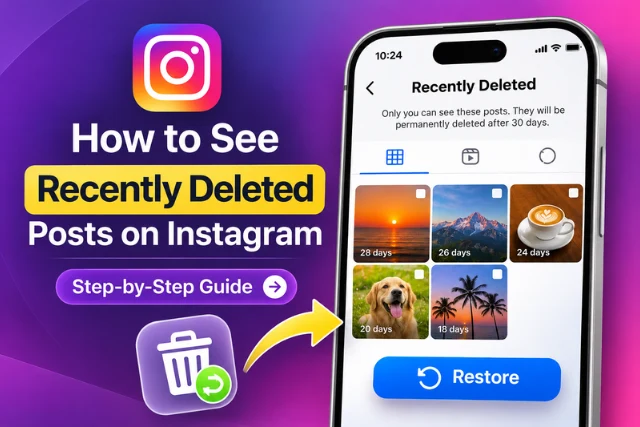
Once you open the Recently Deleted folder, you can browse your removed Instagram content by category. Select a photo, video, reel, or story to preview it. If the content is still within Instagram’s recovery period, you may also have the option to restore it to your account.
You’ll see your deleted content sorted into tabs across the top: a grid icon for posts, a play icon for reels and videos, and a circle icon for stories. If you haven’t deleted anything in the past 30 days, you’ll just get a message saying there’s nothing there.
Scroll through and tap anything to open it. You can look at it without restoring it, which is handy if you just want to grab a caption you wrote or check what the photo was.
How to Restore Recently Deleted Instagram Posts
Found the one you want to restore? It takes about 30 seconds.
- Open it and click the three-dot menu (top or bottom of post, depending on your app).
- Press Restore and then press Restore again to verify.
- You’re about to get a verification code sent to your email or number.
After completing the verification process, Instagram will restore the selected content to your account. This is useful when you accidentally delete a post and want to recover your original photo, caption, likes, and comments, provided the content is still eligible for restoration.
This step may be annoying but it’s for your own security – and your account’s too. If hackers gain access to your account and delete your posts, they can’t delete them permanently from Recently Deleted without a code.
Once you get it, your photo will return to your profile in the same spot it was in before, including any likes, comments, and captions.
If you don’t get the code: Send a message to your email or phone to see if it lands in your spam folder, and be sure your account has current information in your Accounts Center. If it takes a minute to arrive, you may want to wait a little before requesting a new one.
Can You Do This on a Computer?
Mostly, no. Recently Deleted lives in the mobile app. If you only have a laptop handy, you’ll need to grab your phone. It’s one of those Instagram quirks that doesn’t really make sense, but that’s how it works right now.
Can You Recover Recently Deleted Instagram Posts After 30 Days?
Here’s where we have to be straight with you. Once a post leaves Recently Deleted, either because the 30 days ran out or because you chose “Delete” inside the folder, Instagram doesn’t keep a copy you can get back. Support tickets won’t restore it. And the “Download your information” tool won’t include it either, since that export only covers what’s on your account when you request it.
That doesn’t mean the photo itself is gone from your life, though. A few places are worth checking:
Your phone’s photo library: If you took the picture on your phone, the original may still be in your camera roll. Check the “Recently Deleted” album in your Photos or Gallery app too, since phones have their own 30-day trash.
Instagram’s saved originals: Instagram has a setting that saves a copy of anything you post to your phone. If it was on, look for an album called “Instagram” in your photos.
iCloud or Google Photos: Cloud backups often have copies of photos you’ve long since deleted from your phone.
Friends who were tagged or who saved it: It’s low-tech, but a friend who took a screenshot or was in the photo may have it.
Other platforms: If you cross-posted to Facebook, a Facebook story, or Threads, the copy there is separate from your Instagram post.
This is usually the only realistic route for people searching for posts from years ago. If it’s not in one of these places, it’s very likely gone for good.
Instagram Archived vs. Deleted Posts: What’s the Difference?
A lot of “missing” posts were never deleted at all. They were archived.
Archiving hides a post from your profile, but Instagram keeps it forever, with all its likes and comments. Nobody else can see it, and there’s no 30-day timer. You can find archived content from your profile menu under Archive, or under Your activity.
If you’re not sure whether you deleted or archived something, check both places. And if you’re about to clean up your grid but aren’t 100% sure you’ll never want a post again, archive it instead of deleting it. In the future you will be grateful.
What About Posts Instagram Removed?
Sometimes a post disappears and you don’t touch it. That usually means Instagram took it down for breaking its rules, whether that’s a copyright claim on the music, a flagged image, or a mass report.
These posts don’t go into your Recently Deleted folder. Instead, check Account Status in your settings. It shows content Instagram removed and why, and it often gives you an option to request a review if you think it was a mistake. Appeals don’t always work, but they’re worth a shot if the post matters to you.
Can You See Someone Else’s Recently Deleted Instagram Posts?
Short answer: no.
Is the deleted post still available on Instagram? Deleted posts are very much just in your account, and you cannot view any other persons’ posts after they have deleted their posts.
There are apps and websites that claim to show deleted Instagram content, but you should be cautious about using them. Similarly, if you’re trying to understand other Instagram account activity, learn how to know if someone blocked you on Instagram.
They may request access to your Instagram account, which could get your account hacked or banned for spam, and is against Instagram’s Terms of Use.
The unfortunate reality is that after someone else deletes the post, the only remaining copies are those that they have saved or screenshotted.
A Few Habits That Save You From This Next Time
No elaborate backup plan required. Just a few simple adjustments:
- Enable story archiving so deleted stories are stored for 30 days instead of only 24 hours.
- Leave “Save original photos” enabled in your Instagram settings to have every post saved to your camera roll.
- Archive (a non-permanent delete) instead of delete if you’re on the fence.
- Update your email address and phone number so you get the verification code when you really need it.
Download your information now and then if your Instagram is important to you, like for a small business or creator account. It’s the closest thing to a full backup Instagram offers.
Conclusion
Knowing how to see recently deleted posts on Instagram can help you recover photos, videos, reels, and stories that you removed by mistake. You can find eligible content in the Recently Deleted section under Your Activity and restore it before the recovery period expires.
If a post is no longer available there, check your phone’s gallery or cloud backups for another copy. To avoid losing important content in the future, consider archiving posts or keeping original photos saved on your device.
Frequently Asked Questions (FAQ’s)
How to See Recently Deleted Posts on Instagram?
To see recently deleted posts on Instagram, open your profile, tap the three-line menu, select Your Activity, and open Recently Deleted. You can view eligible deleted photos, videos, reels, and stories from this section.
Can I see recently deleted Instagram posts without restoring them?
Yes. You can open and preview content in the Recently Deleted folder without restoring it. This lets you check the photo, video, or other content before deciding whether to bring it back to your profile.
How long do deleted Instagram posts stay recoverable?
Posts, reels, and videos stay for 30 days. Stories that weren’t archived stay for 24 hours.
Can I recover a post I deleted over 30 days ago?
Not through Instagram. Check your phone’s photos, cloud backups, or friends who may have saved it.
Why can’t I find Recently Deleted in my app?
Update Instagram and look under Your activity. On newer versions it may be inside “Removed and archived content.”
Do likes and comments come back when I restore a post?
In most cases, yes. The post returns to its original spot with its engagement.
Why is Instagram asking for a code?
It confirms you’re the real account owner. This stops hackers from permanently deleting your content.
Can I see recently deleted posts on a computer?
Generally no. You’ll need the Instagram mobile app.
Is archiving the same as deleting?
No. Archived posts are hidden but kept forever. Deleted posts are removed after 30 days.
Can I see someone else’s deleted Instagram posts?
No. Instagram only lets you see and restore your own deleted content.
Are Instagram deleted post viewer apps safe?
Generally not. Many want your login details and can put your account at risk.
Instagram deleted my post. How do I get it back?
Check Account Status in your settings. If Instagram removed it, you may be able to request a review.
Does “Download your information” include deleted posts?
No. It only includes what’s on your account at the time you request it.
Sources Worth Checking
- Instagram Help Center: Recovering deleted content, archiving posts, and Account Status
- Meta Accounts Center: Dor checking your contact details and downloading your information
Disclaimer
This article is intended for informational and educational purposes only. The steps explained to see recently deleted posts on Instagram are based on the platform’s available features and may change with future app updates. The recovery period and availability of deleted content may vary depending on the content type and Instagram’s policies. We recommend checking Instagram’s official Help Center for the latest information. Avoid using third-party apps or websites that claim to recover deleted Instagram posts, especially those requesting your account login details.